|
|
| (84 dazwischenliegende Versionen desselben Benutzers werden nicht angezeigt) |
| Zeile 1: |
Zeile 1: |
| − | ==Test==
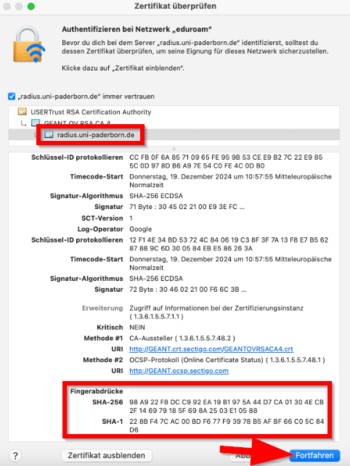
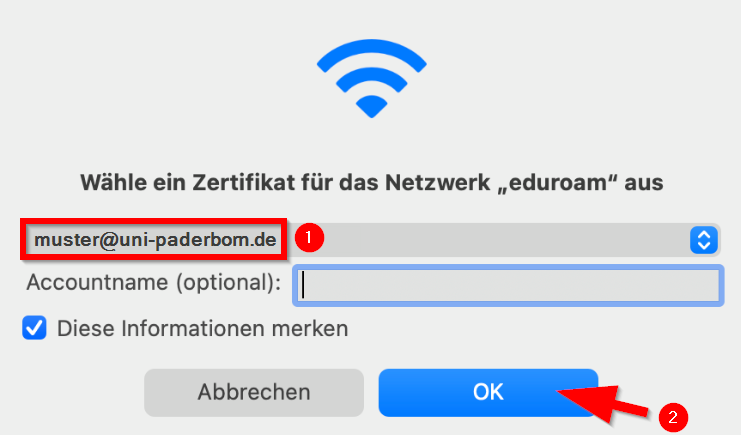
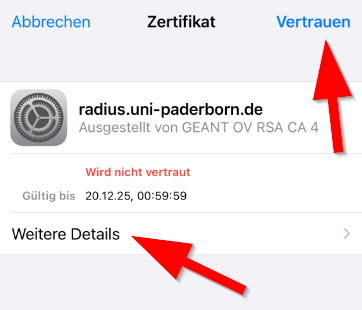
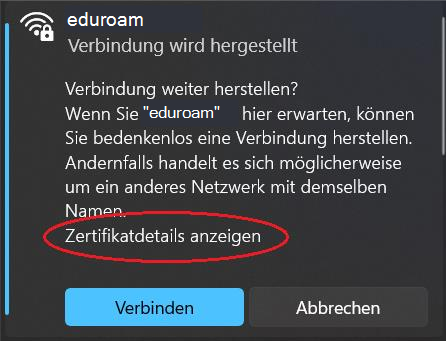
| + | {{Fingerprint Radiuszertifikat}} |
| − | {| class="wikitable" | |
| − | |-
| |
| − | !
| |
| − | ! [[Nutzung_von_Webkonferenzdiensten_des_DFN|DFNconf]]
| |
| − | ! [[Zoom|Zoom <u>mit</u> E2E-Encryption]]
| |
| − | ! [[Zoom|Zoom <u>ohne</u> E2E-Encryption]]
| |
| − | ! [[Microsoft 365]]
| |
| − | |-
| |
| − | | Anmeldung
| |
| − | | colspan="4" |Organisator*in mit Uni-Account
| |
| − | |-
| |
| − | ! Gruppen-größe
| |
| − | | < 23 || < 300 || < 300 || < 20-30
| |
| − | |-
| |
| − | | colspan="4" |Bis auf die Anzahl bei DFNconf handelt es sich um Erfahrungsgrößen, welche Werkzeuge für welche Größen gut funktionieren.
| |
| − | |-
| |
| − | | Stabilität
| |
| − | | colspan="4" |Technische Probleme sind eher unabhängig von der Teilnehmerzahl. Abhängigkeiten scheint es eher von der technischen Ausstattung (Hardware, Security-Software, Browserversionen, Mikrophone/Headsets) und der Internetverbindung (auch Router-, Firewall-Konfiguration) der Teilnehmer*innen zu geben.
| |
| − | |-
| |
| − | | Geeignet für
| |
| − | | colspan="2"|
| |
| − | * Vertraulicher Austausch in Arbeitsgruppen, Forschungsgruppen und Projekten
| |
| − | * Gremienarbeit
| |
| − | |
| |
| − | * Konferenzen mit nicht-vertraulichen Inhalten
| |
| − | |
| |
| − | * Teamarbeit mit nicht-vertraulichen Inhalten
| |
| − | |-
| |
| − | | Funktionalität
| |
| − | |
| |
| − | * Videokonferenz
| |
| − | * Chat
| |
| − | * Screensharing
| |
| − | |
| |
| − | * Videokonferenz
| |
| − | * Chat
| |
| − | * Screensharing
| |
| − | * Dokumententausch
| |
| − | * Whiteboard
| |
| − | |
| |
| − | * Videokonferenz
| |
| − | * Chat (kann gespeichert werden)
| |
| − | * Screensharing
| |
| − | * Dokumententausch
| |
| − | * Whiteboard
| |
| − | * Aufzeichnung
| |
| − | * Breakout-Rooms
| |
| − | |
| |
| − | * Videokonferenz
| |
| − | * Gruppenchats (themenbasierte Kanäle)
| |
| − | * Screensharing
| |
| − | * Dokumentenaustausch
| |
| − | * Terminfindungshilfe
| |
| − | |-
| |
| − | ! Vertraulichkeit
| |
| − | ! colspan="3" |Vertraulichkeit gewährleistet
| |
| − | ! colspan="3" |Vertraulichkeit nicht gewährleistet / keine vertraulichen oder sensiblen personenbezogenen Daten erlaubt
| |
| − | |-
| |
| − | ! Betrieb
| |
| − | | Betrieb durch den DFN-Verein
| |
| − | | colspan="3"|
| |
| − | * Kommerzielles Tool eines US-amerikanischen Anbieters
| |
| − | * Lizensiert über deutschen Anbieter
| |
| − | * Betrieb auf Servern in Europa
| |
| − | |Kommerzielles Tool eines US-amerikanischen Anbieters
| |
| − | |-
| |
| − | ! Datenschutz
| |
| − | || Datenschutzerklärung -> [https://www.conf.dfn.de/datenschutz DFN-Verein]
| |
| − | || Datenschutzerklärung -> [https://imt.uni-paderborn.de/fileadmin/imt/datenschutz/Zoom_C4V/Datenschutzerklaerung_Zoom_C4V.pdf DE_Zoom.pdf]
| |
| − | || Datenschutzerklärung -> [https://imt.uni-paderborn.de/fileadmin/imt/datenschutz/Zoom_C4V/Datenschutzerklaerung_Zoom_C4V.pdf DE_Zoom.pdf]
| |
| − | |[[Datenschutzhinweise zu Cloud-Diensten amerikanischer Anbieter]]
| |
| − | |}
| |
| − | | |
| − | ==Rest==
| |
| − | | |
| − | Test. Hallo.
| |
| − | [[Datei:Test-jnk.png|alternativtext=Screenshot aus dem HilfeWiki - Bild mit dem Grafischen Editor hinzufügen|links|gerahmt|Testbild]]
| |
| − | <br claear=all>
| |
| − | | |
| − | <!--
| |
| − | ==Öffnungszeiten==
| |
| − | ===Semesterferien===
| |
| − | <div align="center">
| |
| − | {| class="wikitable" style="font-size:10px">
| |
| − | |-
| |
| − | |style="text-align:center; font-size:12px"|
| |
| − | |style="text-align:center; font-size:12px"| '''Mo'''
| |
| − | |style="text-align:center; font-size:12px"| '''Di-Do'''
| |
| − | |style="text-align:center; font-size:12px"| '''Fr'''
| |
| − | |-
| |
| − | |style="text-align:center; font-size:12px"| '''Vor-Ort-Support'''
| |
| − | |style="text-align:center; font-size:12px"| -
| |
| − | |style="text-align:center; font-size:12px"| 09:00 - 13:00
| |
| − | |style="text-align:center; font-size:12px"| -
| |
| − | |-
| |
| − | |style="text-align:center; font-size:12px"| '''Telefonsupport'''
| |
| − | |colspan="2" style="text-align:center; font-size:12px"| 08:30 - 13:00 & 13:30 - 15:00
| |
| − | |style="text-align:center; font-size:12px"| 08:30 - 13:00
| |
| − | |}
| |
| − | </div>
| |
| − | | |
| − | ===KW 39===
| |
| − | <div align="center">
| |
| − | {| class="wikitable" style="font-size:10px">
| |
| − | |-
| |
| − | |style="text-align:center; font-size:12px"|
| |
| − | |style="text-align:center; font-size:12px"| '''Mo-Mi'''
| |
| − | |style="text-align:center; font-size:12px"| '''Do'''
| |
| − | |style="text-align:center; font-size:12px"| '''Fr'''
| |
| − | |-
| |
| − | |style="text-align:center; font-size:12px"| '''Vor-Ort-Support'''
| |
| − | |colspan="2" style="text-align:center; font-size:12px"| 09:00 - 13:00
| |
| − | |style="text-align:center; font-size:12px"| -
| |
| − | |-
| |
| − | |style="text-align:center; font-size:12px"| '''Telefonsupport'''
| |
| − | |style="text-align:center; font-size:12px"| 08:30 - 16:00
| |
| − | |style="text-align:center; font-size:12px"| 08:30 - 13:00
| |
| − | |style="text-align:center; font-size:12px"| -
| |
| − | |}
| |
| − | </div>
| |
| − | | |
| − | -->
| |
| − | <br clear=all>
| |
| − | ===Im Semester===
| |
| − | <div align="center">
| |
| − | {| class="wikitable" style="font-size:10px">
| |
| − | |-
| |
| − | |style="text-align:center; font-size:12px"|
| |
| − | |style="text-align:center; font-size:12px"| '''Mo-Do'''
| |
| − | |style="text-align:center; font-size:12px"| '''Fr'''
| |
| − | |-
| |
| − | |style="text-align:center; font-size:12px"| '''Vor-Ort-Support'''
| |
| − | |style="text-align:center; font-size:12px"| 08:30 - 16:00
| |
| − | |style="text-align:center; font-size:12px"| Brückentag
| |
| − | |-
| |
| − | |style="text-align:center; font-size:12px"| '''Telefonsupport'''
| |
| − | |style="text-align:center; font-size:12px"| 08:30 - 16:00
| |
| − | |style="text-align:center; font-size:12px"| Brückentag
| |
| − | |}
| |
| − | </div>
| |
| − | | |
| − | <!--
| |
| − | == DE ==
| |
| − | UPB-App herunterladen
| |
| − | {| class="wikitable" style="vertical-align:middle;"
| |
| − | | [[Datei:Logo Android.png|50px|link=https://play.google.com/store/apps/details?id=com.uninow.upb&hl=de]] || [https://play.google.com/store/apps/details?id=com.uninow.upb&hl=de Android]
| |
| − | |- style="vertical-align:middle;"
| |
| − | |[[Datei:Logo iPadOS.png|50px|link=https://apps.apple.com/de/app/uni-paderborn/id6462860571]] ||[https://apps.apple.com/de/app/uni-paderborn/id6462860571 iOS]
| |
| − | |}
| |
| − | | |
| − | [[Datei:Digitaler-Studierendenausweis-01.jpeg|50px]] Öffne die UPB App
| |
| − | | |
| − | | |
| − | [[Datei:Digitaler-Studierendenausweis-02.png|links|mini|ohne|250px]]
| |
| − | <br>
| |
| − | * Klicke auf '''"Meine UPB-App"'''.
| |
| − | * Klicke auf '''"Studierendenausweis"'''.
| |
| − | <br clear=all>
| |
| − | | |
| − | | |
| − | [[Datei:Digitaler-Studierendenausweis-03.png|links|mini|ohne|250px|Login mit Hochschul-Account]]
| |
| − | <br>
| |
| − | * Klicke auf '''"Login mit Hochschul-Account"'''
| |
| − | <br clear=all>
| |
| − | | |
| − | | |
| − | [[Datei:Digitaler-Studierendenausweis-04.png|links|mini|ohne|250px|Mit Uni-Account anmelden]]
| |
| − | <br>
| |
| − | * Gib Benutzername und Passwort für deinen Uni-Account ein.
| |
| − | * Klicke anschließend auf '''"Anmelden"'''.
| |
| − | <br clear=all>
| |
| − | | |
| − | | |
| − | [[Datei:Digitaler-Studierendenausweis-06.png|links|mini|ohne|250px|Daten an UniNow übertragen]]
| |
| − | <br>
| |
| − | * Du bekommst nun eine Auflistung der Informationen, die an UniNow übermittelt werden.
| |
| − | * Klicke auf '''"Informationen übertragen"'''.
| |
| − | <br clear=all>
| |
| − | | |
| − | [[Datei:Digitaler-Studierendenausweis-05.png|links|mini|ohne|250px|Hinweise akzeptieren]]
| |
| − | <br>
| |
| − | * Lies dir die Hinweise durch und setze die entsprechenden Haken.
| |
| − | * Klicke anschließend auf '''"Weiter"'''.
| |
| − | <br clear=all>
| |
| − | | |
| − | Du kannst deinen Digitalen Studierendenausweis nun verwenden.
| |
| − | | |
| − | [[Datei:Digitaler-Studierendenausweis-09.png|links|mini|ohne|350px|Studierendenausweis in der UPB-App]]
| |
| − | <br clear=all>
| |
| − | | |
| − | | |
| − | == Im Serviceportal ==
| |
| − | Rufe das Serviceportal auf:
| |
| − | * https://serviceportal.uni-paderborn.de
| |
| − | * Melde dich mit deinem Uni-Account an
| |
| − | | |
| − | [[Datei:Digitaler-Studierendenausweis-07.png|links|mini|ohne|250px|Persönliche Daten]]
| |
| − | <br>
| |
| − | * Gehe unter '''"Benutzerverwaltung"''' auf '''"Persönliche Daten"'''.
| |
| − | <br clear=all>
| |
| − | | |
| − | | |
| − | [[Datei:Digitaler-Studierendenausweis-08.png|links|mini|ohne|250px|Studierendenausweis herunterladen]]
| |
| − | <br>
| |
| − | * Klicke auf '''"Studierendenausweis PDF"''' um deinen Ausweis herunterzuladen.
| |
| − | <br clear=all>
| |
| − | | |
| − | == FAQ ==
| |
| − | Gibt es die UPB-App in alternativen Appstores? Wo finde ich die APK-Datei zum Sideloading?
| |
| − | * Derzeit ist die UPB-App nur im App Store für iOS und im Playstore für Android verfügbar.
| |
| − | * Falls du die oben genannten Stores nicht nutzen kannst, kannst du den Studierendenausweis als PDF über das Serviceportal herunterladen.
| |
| − | * https://serviceportal.uni-paderborn.de/
| |
| − | | |
| − | Wie kann ich den Digitalen Studierendenausweis bei Krankenkassen, Banken und ähnlichen Anbieter einreichen?
| |
| − | * Falls du ein Nachweisdokment über dein Studium einreichen musst, ist dafür die Immatrikulationsbescheinigung vorgesehen. Du kannst diese in [https://paul.uni-paderborn.de PAUL] unter Menü / Meine Daten / Meine Dokumente herunterladen.
| |
| − | * https://paul.uni-paderborn.de
| |
| − | * Der Digitale Studierendenausweis ist ausschließlich zum Vorzeigen vor Ort vorgesehen.
| |
| − | | |
| − | == EN ==
| |
| − | UPB-App herunterladen
| |
| − | {| class="wikitable" style="vertical-align:middle;"
| |
| − | | [[Datei:Logo Android.png|50px|link=https://play.google.com/store/apps/details?id=com.uninow.upb&hl=de]] || [https://play.google.com/store/apps/details?id=com.uninow.upb&hl=de Android]
| |
| − | |- style="vertical-align:middle;"
| |
| − | |[[Datei:Logo iPadOS.png|50px|link=https://apps.apple.com/de/app/uni-paderborn/id6462860571]] ||[https://apps.apple.com/de/app/uni-paderborn/id6462860571 iOS]
| |
| − | |}
| |
| − | | |
| − | [[Datei:Digitaler-Studierendenausweis-01.jpeg|50px]] Open the UPB-App
| |
| − | | |
| − | | |
| − | [[Datei:Digitaler-Studierendenausweis-02.png|links|mini|ohne|250px]]
| |
| − | <br>
| |
| − | * Click on '''"Meine UPB-App"'''.
| |
| − | * Click on '''"Studierendenausweis"'''.
| |
| − | <br clear=all>
| |
| − | | |
| − | | |
| − | [[Datei:Digitaler-Studierendenausweis-03.png|links|mini|ohne|250px|Login with university account]]
| |
| − | <br>
| |
| − | * Click on '''"Login mit Hochschul-Account"'''
| |
| − | <br clear=all>
| |
| − | | |
| − | | |
| − | [[Datei:Digitaler-Studierendenausweis-04.png|links|mini|ohne|250px|Login with Uni-Account]]
| |
| − | <br>
| |
| − | * Insert your username and password for the Uni-Account
| |
| − | * Click on '''"Anmelden"'''.
| |
| − | <br clear=all>
| |
| − | | |
| − | [[Datei:Digitaler-Studierendenausweis-06.png|links|mini|ohne|250px|Transmit data to UniNow]]
| |
| − | <br>
| |
| − | * You will now see a list of the information that will be transmitted to UniNow.
| |
| − | * Click on '''"Transfer information"'''.
| |
| − | <br clear=all>
| |
| − | | |
| − | [[Datei:Digitaler-Studierendenausweis-05.png|links|mini|ohne|250px|Accept instructions]]
| |
| − | <br>
| |
| − | * Read through the instructions carefully and tick the appropriate boxes.
| |
| − | * Then click on '''"Continue"'''.
| |
| − | <br clear=all>
| |
| − | | |
| − | You can now use your digital student ID card.
| |
| − | | |
| − | [[Datei:Digitaler-Studierendenausweis-09.png|links|mini|ohne|350px|student ID card in the UPB-App]]
| |
| − | <br clear=all>
| |
| − | | |
| − | == Serviceportal==
| |
| − | Open the Serviceportal:
| |
| − | * https://serviceportal.uni-paderborn.de
| |
| − | * Login with your Uni-Account
| |
| − | | |
| − | [[Datei:Digitaler-Studierendenausweis-07.png|links|mini|ohne|250px|Persönliche Daten]]
| |
| − | <br>
| |
| − | * Visit '''"Benutzerverwaltung"''' an click on '''"Persönliche Daten"'''.
| |
| − | <br clear=all>
| |
| − | | |
| − | [[Datei:Digitaler-Studierendenausweis-08.png|links|mini|ohne|250px|Studierendenausweis herunterladen]]
| |
| − | <br>
| |
| − | * Click on '''"Studierendenausweis PDF"''' to download your student ID card.
| |
| − | <br clear=all>
| |
| − | | |
| − | [[Datei:Digitaler-Studierendenausweis-10.png|links|mini|ohne|250px|Student ID card]]
| |
| − | <br>
| |
| − | * Save the PDF file on your device.
| |
| − | <br clear=all>
| |
| − | | |
| − | ==FAQ==
| |
| − | Is the UPB app available in alternative app stores? Where can I find the APK file for sideloading?
| |
| − | * The UPB app is currently only available in the App Store for iOS and the Playstore for Android.
| |
| − | * If you cannot use the stores mentioned above, you can download the digital student ID via the Serviceportal.
| |
| − | * https://serviceportal.uni-paderborn.de/
| |
| − | | |
| − | How can I submit the Digital Student ID to health insurance companies, banks and similar providers?
| |
| − | * If you need to submit proof of your studies, the certificate of enrolment is intended for this purpose. You can download this in [https://paul.uni-paderborn.de PAUL] under Menu / My data / My documents.
| |
| − | * https://paul.uni-paderborn.de
| |
| − | * The digital student ID is only intended for presentation on site.
| |
| − | | |
| − | <!--
| |
| − | ==Test File URL Workingpaper==
| |
| − | | |
| − | ==Signierte E-Mails verschicken==
| |
| − | | |
| − | Bei Verwendung des Internet Explorers (ab Version 10) kann in den Nachrichtenoptionen die S/MIME-Einstellungen aktiviert werden.
| |
| − | | |
| − | | |
| − | [[Datei:Screenshot Exchange2013 OWASMIME.png]]
| |
| − | | |
| − | | |
| − | Verwenden Sie S/MIME zum ersten Mal innerhalb der OWA, werden Sie zunächst aufgefordert ein zusätzliches Steuerelement zu installieren, dies müssen Sie bestätigen.
| |
| − | Damit das Steuerelement installiert werden kann, muss auf Ihrem PC .NET Framework 4.5 oder höher installiert sein.
| |
| − | | |
| − | Anleitungen zum Erstellen eines Zertifikats und deren Nutzung finden Sie unter:
| |
| − | [[E-Mail-Zertifikat beantragen]]
| |
| − | | |
| − | ===Test v1===
| |
| − | * [https://homepages.uni-paderborn.de/jnk/Test.jpg Test https]
| |
| − | * [http://homepages.uni-paderborn.de/jnk/Test.jpg Test http]
| |
| − | | |
| − | ===Test v2===
| |
| − | * [https://groups.uni-paderborn.de/imt/test-jnk/Testdokument.pdf Test https PDF]
| |
| − | * [http://groups.uni-paderborn.de/imt/test-jnk/Testdokument.pdf Test http PDF]
| |
| − | | |
| − | <!--
| |
| − | ==Akkordion==
| |
| − | <bootstrap_accordion>
| |
| − | <bootstrap_panel heading="Headline for Panel1" color="info">
| |
| − | <pre> Test </pre>
| |
| − | test
| |
| − | </bootstrap_panel>
| |
| − | | |
| − | <bootstrap_panel heading="Headline for Panel2" color="info">
| |
| − | test
| |
| − | </bootstrap_panel>
| |
| − | | |
| − | </bootstrap_accordion>
| |
| − | | |
| − | ==Entwurf wikitable==
| |
| − | | |
| − | Häufig gesucht
| |
| − | {| class="wikitable"
| |
| − | | [[Datei:mail.png|90px|center|link=Mail]] || [[Datei:Exchange.png|90px|center|link=Exchange]] || [[Datei:wlan.png|center|90px|link=Wlan]] || [[Datei:Logo_PANDA.png|90px|link=PANDA]] || [[Datei:Network.png|90px|center|link=Netzwerk]] || [[Datei:Netstorage.png|90px|center|link=Netzwerkspeicher]] || [[Datei:Uni-Kralle.png|90px|center|link=Uni-Account]] || [[Datei:Logo_Zertifizierungsinstanz.png|center|90px|link=Zertifizierungsinstanz]]
| |
| − | |-
| |
| − | | [[Mail]] || [[Exchange]] || [[WLAN]] || [[PANDA]] || [[Netzwerk]] || [[Netzwerkspeicher]] || [[Uni-Account]] || [[Zertifizierungsinstanz]]
| |
| − | |}
| |
| − | <br clear=all>
| |
| − | | |
| − | Eigene Dienste
| |
| − | {| class="wikitable"
| |
| − | | [[Datei:Service selfcare.png|90px|center|link=Anmeldedienst]] || [[Datei:Logo Cloudcomputing.png|center|90px|link=Coudcomputing]] || [[Datei:Service datastorage.png|90px|center|link=Datensicherung]] || [[Datei:Logo_RIS.png|center|90px|link=RIS]] || [[Datei:Computerpool.png|90px|center|link=Raumnutzung]] || [[Datei:Sharepoint.png|90px|center|link=SharePoint]] || [[Datei:Typo3.png|90px|center|link=TYPO3]] || [[Datei:Logo_Videokonferenz.png|center|90px|link=Videokonferenz]] || [[Datei:Logo Videoportal.png|90px|center|link=Videoportal]] || [[Datei:Service www.png|center|90px|center|link=Webanwendungen]] || [[Datei:Verschiedenes.png|90px|center|link=Verschiedenes]]
| |
| − | |-
| |
| − | | [[Anmeldedienst]] || [[Cloudcomputing]] || [[Datensicherung]] || [[RIS]] || [[Raumnutzung]] || [[SharePoint]] || [[TYPO3]] || [[Videokonferenz]] ||[[Videoportal]] || [[Webanwendungen]] || [[Verschiedenes | Weitere Dienste]]
| |
| − | |}
| |
| − | <br clear=all>
| |
| − | | |
| − | Externe Dienste
| |
| − | {| class="wikitable"
| |
| − | |[[Datei:Logo_Antivirensoftware.png|center|90px|link=Antivirensoftware]] || [[Datei:Logo GitLab.png|center|90px|link=GitLab]] || [[Datei:Logo_Microsoft_Office_Portale.png|90px|center|link=Microsoft Office Portale]] || [[Datei:Logo sciebo.jpeg|center|90px|link=Sciebo]] || [[Datei:Logo_Zoom.png|center|90px|link=Zoom]] || [[Datei:Software.png|center|90px|link=Software]]
| |
| − | |-
| |
| − | | [[Antivirensoftware]] || [[GitLab]] || [[Microsoft Office Portale | MS Office]] || [[Sciebo]] || [[Zoom]] || [[Software | Weitere Software]]
| |
| − | |}
| |
| − | <br clear=all>
| |
| − | | |
| − | Beratung und Unterstützung
| |
| − | {| class="wikitable"
| |
| − | |[[Datei:Logo_Apple-Support.png|center|90px|link=Apple-Support]] || [[Datei:Logo_Endgerätesupport.png|center|90px|link=Endgerätesupport]] || [[Datei:Logo_Informationssicherheit.png|center|90px|link=Informationssicherheit]] || [[Datei:Logo Service Medien.png|90px|center|link=Medientechnische Veranstaltungsunterstützung]]
| |
| − | |-
| |
| − | | [[Apple-Support]] || [[Endgerätesupport]] || [[Informationssicherheit]] || [[Medientechnische Veranstaltungsunterstützung]]
| |
| − | |}
| |
| − | <br clear=all>
| |
| − | | |
| − | ==Entwurf packed overlay==
| |
| − | | |
| − | <gallery mode="packed">
| |
| − | Datei:mail.png|''[[Mail]]''
| |
| − | Datei:Exchange.png|''[[Exchange]]''
| |
| − | Datei:wlan.png|''[[WLAN]]''
| |
| − | Datei:Logo_PANDA.png|''[[PANDA]]''
| |
| − | Datei:Network.png|''[[Netzwerk]]''
| |
| − | Datei:Netstorage.png|''[[Netzwerkspeicher]]''
| |
| − | Datei:Uni-Kralle.png|''[[Uni-Account]]''
| |
| − | Datei:Logo_Zertifizierungsinstanz.png|''[[Zertifizierungsinstanz]]''
| |
| − | </gallery>
| |
| − | | |
| − | Eigene Dienste
| |
| − | <gallery mode="packed-overlay">
| |
| − | Datei:Service selfcare.png|''[[Anmeldedienst]]''
| |
| − | Datei:Logo Cloudcomputing.png|''[[Cloudcomputing]]''
| |
| − | Datei:Service datastorage.png|''[[Datensicherung]]''
| |
| − | Datei:Computerpool.png|''[[Raumnutzung]]''
| |
| − | Datei:Sharepoint.png|''[[SharePoint]]''
| |
| − | Datei:Typo3.png|''[[TYPO3]]''
| |
| − | Datei:Logo Videoportal.png|''[[Videoportal]]''
| |
| − | Datei:Service www.png|''[[Webanwendungen]]''
| |
| − | Datei:Verschiedenes.png|''[[Verschiedenes]]''
| |
| − | </gallery>
| |
| − | | |
| − | | |
| − | Externe Dienste
| |
| − | | |
| − | | |
| − | Externe Dienste
| |
| − | {| class="wikitable"
| |
| − | | || [[Datei:Logo GitLab.png|center|90px|link=GitLab]] || [[Datei:Logo_Microsoft_Office_Portale.png|90px|center|link=Microsoft Office Portale]] || [[Datei:Logo sciebo.jpeg|center|90px|link=Sciebo]] || [[Datei:Logo_Zoom.png|center|90px|link=Zoom]]
| |
| − | |-
| |
| − | | [[Antivirensoftware]] || [[GitLab]] || [[Microsoft Office Portale | MS Office]] || [[Sciebo]] || [[Zoom]] || [[Software | Weitere Software]]
| |
| − | |}
| |
| − | <br clear=all>
| |
| − | | |
| − | Beratung und Unterstützung
| |
| − | {| class="wikitable"
| |
| − | | || || || [[Datei:Logo Service Medien.png|90px|center|link=Medientechnische Veranstaltungsunterstützung]]
| |
| − | |-
| |
| − | | [[Apple-Support]] || [[Endgerätesupport]] || [[Informationssicherheit]] || [[Medientechnische Veranstaltungsunterstützung]]
| |
| − | |}
| |
| − | <br clear=all>
| |
| − | | |
| − | <!--
| |
| − | | |
| − | == Version 2==
| |
| − | Alphabetisch mit angehefteten Diensten aus Titelleiste vorangestellt.
| |
| − | <br>
| |
| − | | |
| − | {| class="wikitable" | |
| − | | [[Datei:mail.png|90px|center|link=Mail]] || [[Datei:Exchange.png|90px|center|link=Exchange]] || [[Datei:wlan.png|center|90px|link=Wlan]] || [[Datei:Logo_PANDA.png|center|90px|link=PANDA]] || [[Datei:Network.png|90px|center|link=Netzwerk]] || [[Datei:Netstorage.png|90px|center|link=Netzwerkspeicher]] || [[Datei:Uni-Kralle.png|90px|center|link=Uni-Account]] ||
| |
| − | |-
| |
| − | | [[Mail]] || [[Exchange]] || [[WLAN]] || [[PANDA]] || [[Netzwerk]] || [[Netzwerkspeicher]] || [[Uni-Account]] || [[Zertifizierungsinstanz]]
| |
| − | |-
| |
| − | |[[Datei:Service selfcare.png|90px|center|link=Anmeldedienst]] || || || [[Datei:Logo Cloudcomputing.png|center|90px|link=Coudcomputing]] || [[Datei:Service datastorage.png|90px|center|link=Datensicherung]] || || [[Datei:Logo GitLab.png|center|90px|link=GitLab]] ||
| |
| − | |-
| |
| − | | [[Anmeldedienst]] || [[Antivirensoftware]] || [[Apple-Support]] || [[Cloudcomputing]] || [[Datensicherung]] || [[Endgerätesupport]] || [[GitLab]] || [[Informationssicherheit]]
| |
| − | |-
| |
| − | | [[Datei:Logo Service Medien.png|90px|center|link=Medientechnische Veranstaltungsunterstützung]] || [[Datei:Logo_Microsoft_Office_Portale.png|90px|center|link=Microsoft Office Portale]] || || [[Datei:Computerpool.png|90px|center|link=Raumnutzung]] || [[Datei:Logo sciebo.jpeg|center|90px|link=Sciebo]] || [[Datei:Sharepoint.png|90px|center|link=SharePoint]] || || [[Datei:Typo3.png|90px|center|link=TYPO3]]
| |
| − | |-
| |
| − | | [[Medientechnische Veranstaltungsunterstützung | Medien]] || [[Microsoft Office Portale | MS Office]] || [[RIS]] || [[Raumnutzung]] || [[Sciebo]] || [[SharePoint]] || [[Software]] || [[TYPO3]]
| |
| − | |-
| |
| − | | [[Datei:Verschiedenes.png|90px|center|link=Verschiedenes]] || || [[Datei:Logo Videoportal.png|90px|center|link=Videoportal]] || [[Datei:Service www.png|center|90px|center|link=Webanwendungen]] || [[Datei:Logo_Zoom.png|center|90px|link=Zoom]]
| |
| − | |-
| |
| − | | [[Verschiedenes]] || [[Videokonferenz]] || [[Videoportal]] || [[Webanwendungen]] || [[Zoom]]
| |
| − | |}
| |
| − | <br clear=all>
| |
| − | | |
| − | | |
| − | ==Version 3==
| |
| − | Nach 4 Themen sortiert mit Accordion.
| |
| − | <br>
| |
| − | | |
| − | <bootstrap_accordion>
| |
| − | | |
| − | <bootstrap_panel heading="Häufig gesucht" active>
| |
| − | {| class="wikitable"
| |
| − | | [[Datei:mail.png|90px|center|link=Mail]] || [[Datei:Exchange.png|90px|center|link=Exchange]] || [[Datei:wlan.png|center|90px|link=Wlan]] || [[Datei:Logo_PANDA.png|90px|link=PANDA]] || [[Datei:Network.png|90px|center|link=Netzwerk]] || [[Datei:Netstorage.png|90px|center|link=Netzwerkspeicher]] || [[Datei:Uni-Kralle.png|90px|center|link=Uni-Account]] ||
| |
| − | |-
| |
| − | | [[Mail]] || [[Exchange]] || [[WLAN]] || [[PANDA]] || [[Netzwerk]] || [[Netzwerkspeicher]] || [[Uni-Account]] || [[Zertifizierungsinstanz]]
| |
| − | |}
| |
| − | </bootstrap_panel>
| |
| − | | |
| − | <bootstrap_panel heading="Eigene Dienste" active>
| |
| − | {| class="wikitable"
| |
| − | | [[Datei:Service selfcare.png|90px|center|link=Anmeldedienst]] || [[Datei:Logo Cloudcomputing.png|center|90px|link=Coudcomputing]] || [[Datei:Service datastorage.png|90px|center|link=Datensicherung]] || || [[Datei:Computerpool.png|90px|center|link=Raumnutzung]] || [[Datei:Sharepoint.png|90px|center|link=SharePoint]] || [[Datei:Typo3.png|90px|center|link=TYPO3]] || [[Datei:Logo Videoportal.png|90px|center|link=Videoportal]] || [[Datei:Service www.png|center|90px|center|link=Webanwendungen]] || [[Datei:Verschiedenes.png|90px|center|link=Verschiedenes]]
| |
| − | |-
| |
| − | | [[Anmeldedienst]] || [[Cloudcomputing]] || [[Datensicherung]] || [[RIS]] || [[Raumnutzung]] || [[SharePoint]] || [[TYPO3]] || [[Videoportal]] || [[Webanwendungen]] || [[Verschiedenes | Weitere Dienste]]
| |
| − | |}
| |
| − | </bootstrap_panel>
| |
| − | | |
| − | <bootstrap_panel heading="Externe Dienste" active>
| |
| − | {| class="wikitable"
| |
| − | | || [[Datei:Logo GitLab.png|center|90px|link=GitLab]] || [[Datei:Logo_Microsoft_Office_Portale.png|90px|center|link=Microsoft Office Portale]] || [[Datei:Logo sciebo.jpeg|center|90px|link=Sciebo]] || [[Datei:Logo_Zoom.png|center|90px|link=Zoom]]
| |
| − | |-
| |
| − | | [[Antivirensoftware]] || [[GitLab]] || [[Microsoft Office Portale | MS Office]] || [[Sciebo]] || [[Zoom]] || [[Software | Weitere Software]]
| |
| − | |}
| |
| − | </bootstrap_panel>
| |
| − | | |
| − | <bootstrap_panel heading="Beratung und Unterstützung" active>
| |
| − | {| class="wikitable"
| |
| − | | || || || [[Datei:Logo Service Medien.png|90px|center|link=Medientechnische Veranstaltungsunterstützung]]
| |
| − | |-
| |
| − | | [[Apple-Support]] || [[Endgerätesupport]] || [[Informationssicherheit]] || [[Medientechnische Veranstaltungsunterstützung]]
| |
| − | |}
| |
| − | </bootstrap_panel>
| |
| − | </bootstrap_accordion>
| |
| − | -->
| |